Add a practice activity manually
GPS sees motion, not intent. A 10-minute parallel-parking drill in the high-school lot moves the car ten feet — the app sees a parked car. You tell LearnerLog "that counted" by adding a manual practice activity.
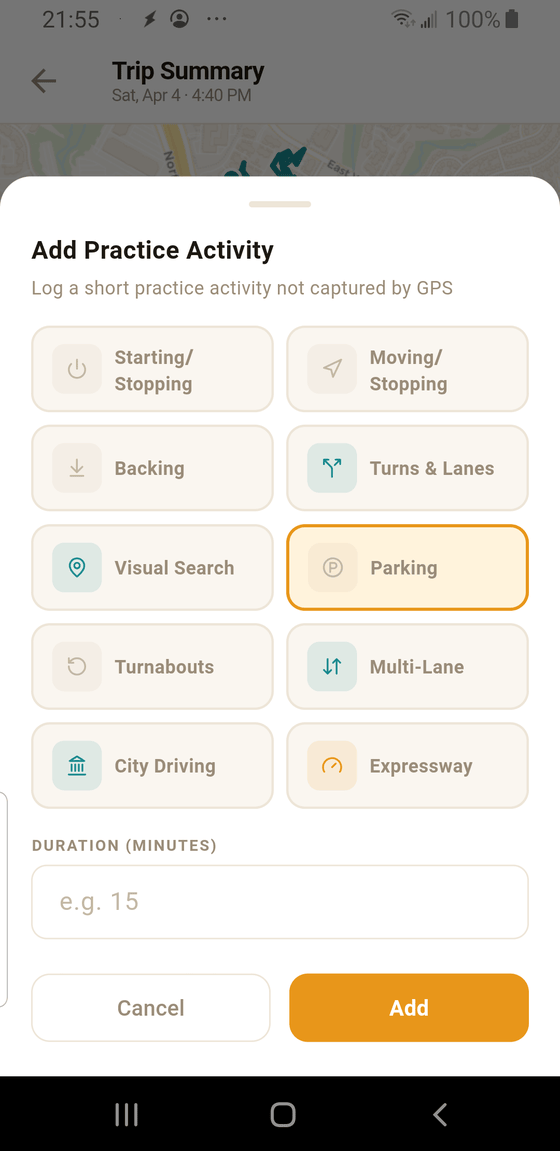
- 1 Sheet header. "Log a short practice activity not captured by GPS." This is your signal that manual activities are legitimate — they're meant for the drills GPS can't see.
- 2 Category grid. Same 10 TDLR categories as the rest of the app. The one you tap is highlighted in amber. Pick whichever matches what actually happened.
- 3 Duration in minutes. A whole number. Most manual activities are 5–15 minutes. You don't have to be exact to the second — TDLR rounds to the minute anyway.
- 4 Add. Commits the activity. It appears at the end of that drive's Practice Activities list and is subject to the same 60-minute-per-day cap as GPS segments.
Which activities typically need manual entry
- Parking. Parallel, angle, perpendicular. You're stationary or nearly so — GPS sees a dot.
- Backing. Down a driveway, out of a parking space, or in a lot. Short, low speed, and often enclosed — not a GPS-friendly pattern.
- Turnabouts. 3-point turns, Y-turns, or a cul-de-sac loop. The odometer barely ticks, but TDLR still requires rows.
- Visual Search drills. Parking in a lot, watching traffic flow, scanning for hazards at a busy 4-way. The car's not moving; the brain is.
Does manual time count toward the TDLR form?
Yes — the same way GPS segments do. Manual activities fill TDLR rows when they meet the minimum duration for that category (typically 10+ minutes), and they're subject to the daily 60-minute cap along with the rest of that day's practice.
Can I add more than one manual activity per drive?
Yes. Tap + Add practice activity as many times as you need. You can also add manual activities to drives from days ago — the drive's date and time stay the same, and the manual entries are tagged to that drive's day for cap and progress purposes.
Tip: Short manual activities are one of the fastest ways to finish the TDLR
form. If your form is stuck with "Need 1 more row" in Parking or Turnabouts, 10 minutes in a
parking lot after dinner counts — go add it.